
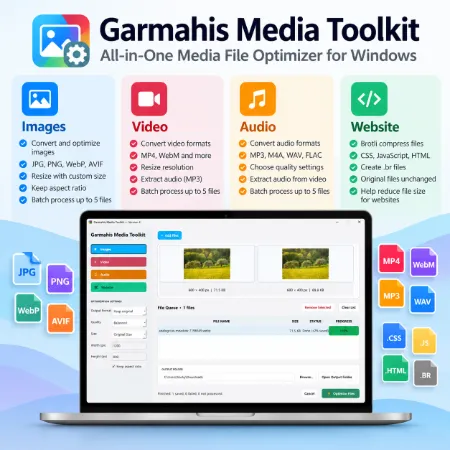
Managing different types of media files often requires several applications. You may need one program to resize images, another to convert videos, and another to prepare audio or website files.
Garmahis Media Toolkit brings these essential tools together in one Windows desktop application. It provides a simple workspace for converting, resizing, and optimizing files without switching between multiple programs.
Whether you’re a content creator, blogger, website owner, or everyday computer user, Garmahis Media Toolkit helps simplify common file-processing tasks.
Four Useful Tools in One Application
1. Image Converter and Optimizer
The Images section allows users to convert and resize pictures for websites, social media, and everyday use.
Key features include:
- Support for JPG, PNG, WebP, AVIF, BMP, and TIFF input images.
- Convert images to JPG, PNG, WebP, or AVIF.
- Choose from Balanced, High Quality, and Smaller File settings.
- Resize images using predefined dimensions or custom sizes.
- Maintain the original aspect ratio when resizing.
- Preview original and optimized images side by side.
- View image dimensions and file sizes.
- Process up to five images in one batch.
This section is particularly useful for preparing images for WordPress websites, blog posts, and online publishing.
2. Video Converter and Resizer
The Video section provides straightforward video conversion and resizing options.
Users can:
- Import common video formats, including MP4, MOV, MKV, WebM, and AVI.
- Convert videos to MP4 or WebM.
- Extract MP3 audio from video files.
- Select original resolution, 1080p, 720p, or 480p.
- Preview videos before and after conversion.
- Play, pause, and view videos in full screen.
- Adjust playback volume.
The application uses FFmpeg for video processing.
3. Audio Converter
The Audio section helps users convert audio files and extract sound from video files.
Supported output formats include:
- MP3 – A widely compatible format for everyday listening.
- M4A – A compressed audio format suitable for many devices.
- WAV – An uncompressed audio format.
- FLAC – A lossless compressed audio format.
Users can choose from three quality presets for compressed audio formats, preview audio playback, and process multiple files.
This makes the Audio section useful for podcasts, recordings, and other everyday audio tasks.
4. Website File Compression
The Website section provides Brotli compression for supported web files.
It can create compressed .br versions of:
- CSS files
- JavaScript files
- HTML files
The original files remain unchanged.
Brotli-compressed files can help reduce transferred data when a website server is properly configured to serve them.
Important: Creating .br files does not automatically enable Brotli compression on a website. Server configuration may be required.
Simple Interface and Batch Processing
Garmahis Media Toolkit features a clean interface with four clearly separated sections: Images, Video, Audio, and Website.
Users can add files, adjust optimization settings, review the processing queue, and choose an output folder.
The software also includes drag-and-drop file support, processing progress indicators, and file previews for supported media types.
By default, processed files are saved in the Windows Downloads folder. Users can choose another destination when needed.
Original Files Remain Unchanged
Garmahis Media Toolkit is designed to preserve original files during conversion and optimization.
When an output filename already exists, the application creates a numbered filename rather than overwriting the existing file.
This allows users to compare their original and processed files before deciding which version to keep.
Who Can Use Garmahis Media Toolkit?
Garmahis Media Toolkit is suitable for:
- Bloggers and website owners preparing images and website assets.
- Content creators converting videos and audio files.
- Social media users resizing images for different platforms.
- Students and office users handling everyday media files.
- Windows users who prefer several useful file tools in one application.
Download Garmahis Media Toolkit
Garmahis Media Toolkit is a free Windows desktop application developed by Garmahis.
It combines image conversion, video processing, audio conversion, and website file compression in one convenient workspace.
Instead of installing separate applications for every task, users can access these essential tools from a single interface.
Download Garmahis Media Toolkit for Windows
Add the official download link here when the installer is published.
Final Thoughts
Garmahis Media Toolkit focuses on practical features, a straightforward interface, and convenient file management.
With four useful tools in one application, it offers a simple way to prepare images, convert videos, process audio, and create compressed website files.
For users who regularly work with different file formats, Garmahis Media Toolkit provides a convenient all-in-one solution.
Download Garmahis Media Toolkit
