
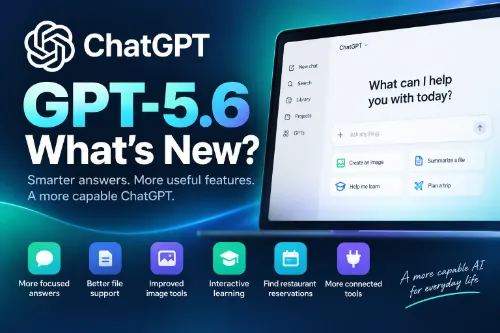
ChatGPT has changed quite a bit in 2026. It is no longer simply a chatbot for asking questions and generating text. New features make it easier to work with files, images, connected services, longer projects, and everyday tasks.
One of the biggest recent changes is GPT-5.6, but there are also several useful ChatGPT features worth knowing about.
GPT-5.6 Is Now Available
OpenAI introduced an updated GPT-5.6 experience in ChatGPT in August 2026.
For Plus and Pro users, GPT-5.6 Sol focuses on more reliable factual answers, more focused responses, and better control over how much reasoning ChatGPT uses for a task.
GPT-5.6 Luna is also being introduced for Free and Go users.
For everyday users, the important point is simple: ChatGPT continues to become better at understanding what you want while producing more focused and useful answers.
Better File and Document Support
Working with files has become a much bigger part of ChatGPT.
You can upload documents, images, spreadsheets, and other supported files and ask ChatGPT to summarize, explain, compare, or analyze their contents.
ChatGPT has also improved its Library and file search features, making it easier to find files and information from previous work.
Google Drive integration can bring Drive files and folders into the ChatGPT Library for eligible users. This makes it possible to work with documents without repeatedly downloading and uploading them.
Work on Larger Projects
ChatGPT is becoming more useful for tasks that take more than a single question and answer.
Projects can keep related conversations, files, and instructions together. ChatGPT Work can handle longer tasks involving research, documents, spreadsheets, presentations, connected services, and other multi-step work.
This makes ChatGPT useful for more than answering questions. It can become a workspace for completing a project from beginning to end.
Better Image Features
ChatGPT can create images from a text description and can also edit existing images.
For example, you can upload a picture and ask ChatGPT to change parts of it, remove or add objects, change its appearance, or create a new version.
This is useful for blog graphics, social media images, design ideas, illustrations, and many other projects.
Video demonstration:
[Add your video link here]
Interactive Learning and Quizzes
ChatGPT now includes more interactive learning features.
You can ask it to quiz you about a subject and answer questions directly inside the conversation. Interactive visual learning is also available for supported math and science topics.
Instead of only reading an explanation, students can interact with some concepts and practice what they have learned.
ChatGPT Can Help Find Restaurant Reservations
ChatGPT can now search for restaurant reservation availability through supported reservation services.
You can provide a location, date, time, party size, and preferences. ChatGPT can then help find suitable restaurants and available reservation times.
This is a good example of how ChatGPT is moving beyond simply providing information and toward helping users complete everyday tasks.
Better Long Conversations
Long ChatGPT conversations have also been improved.
On the web, longer chats can load in smaller sections rather than loading the entire conversation at once. This can make large conversations faster and easier to continue.
For people who use the same conversation for a long-running project, this is a small but useful improvement.
Better Awareness of Time
ChatGPT has also become more aware of your local time during a conversation.
This can help it give more appropriate answers when your question depends on whether it is morning, afternoon, evening, or another time-sensitive situation.
Connected Services and Plugins
ChatGPT can work with an increasing number of external services through plugins and connected tools.
Depending on your plan and settings, these can help ChatGPT find information from services you already use and perform tasks using that information.
Plugin discovery has also been improved to make useful tools easier to find.
ChatGPT Keeps Becoming More Than a Chatbot
The biggest change is not one individual feature.
ChatGPT is gradually becoming a place where you can ask questions, research information, work with your own files, create images, learn, connect other services, and complete larger projects.
GPT-5.6 improves the underlying conversation experience, while the growing collection of ChatGPT features expands what you can actually do with it.
If you have not used ChatGPT recently, it may look familiar at first, but there is considerably more available than there was before.
Introducing ChatGPT Work, powered by Codex and GPT-5.6
