
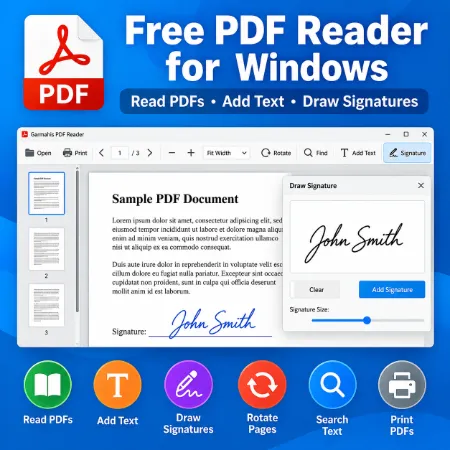
Garmahis PDF Reader is a simple and free PDF reader for Windows. It helps you open, read, add text, and sign PDF documents without complicated editing tools.
You can draw handwritten signatures using a mouse, touchscreen, or digital pen, adjust their size, and place them directly on PDF pages. You can also add text, search documents, and save your changes as a new PDF file.
Simple PDF Reader for Windows
Garmahis PDF Reader provides useful tools for everyday PDF documents.
Features include:
- Open and read PDFs – View PDF documents easily.
- Zoom in and out – Adjust the page size for comfortable reading.
- Fit Width – Fit the PDF page to the available viewing width.
- Page Navigation – Move between pages.
- Rotate Pages – Rotate the page view by 90 degrees.
- Find Text – Search for words inside PDF documents.
- Add Text – Type names, notes, or other information onto a PDF.
- Edit Added Text – Change text size, move text, or delete it.
- Draw Signatures – Create handwritten signatures directly in the application.
- Resize and Move Signatures – Adjust the signature size and position.
- Save PDF – Save documents with your added text and signatures.
- Print PDF – Print PDF documents directly from the application.
Add Text to PDF Documents
The Add Text feature is useful when you need to enter a name, email address, date, or short note on a PDF.
Type your text, select a font size, and add it to the document. You can drag the text to the correct position, change its size, or delete it before saving.
This feature is particularly useful for filling in simple PDF forms that do not have editable text fields.
Draw a Handwritten Signature on a PDF
Garmahis PDF Reader includes a free handwritten signature tool.
You can draw your signature using a mouse, touchscreen, or digital pen without uploading your document to an online signing service.
To add a signature:
- Open your PDF document.
- Click Signature.
- Draw your signature in the drawing box.
- Click Add Signature.
- Drag the signature to the desired position.
- Use the signature size slider to adjust its size.
- Click Save PDF to save your signed document.
You can clear and redraw your signature or delete an added signature if you need to start again.
This feature is useful for signing simple forms, letters, and other documents that accept handwritten electronic signatures.
Save and Print PDF Files
After adding text or a signature, you can save the updated document as a new PDF file.
You can also choose another filename or location when saving your PDF.
The Print PDF feature lets you print documents directly from the application.
Easy to Use and Free
Garmahis PDF Reader focuses on simplicity. The main tools are easy to find, and you do not need to learn a complicated PDF editing interface.
It is suitable for users who want to read PDFs, fill in simple information, add handwritten signatures, and print documents.
Download Free PDF Reader for Windows
Garmahis PDF Reader is available for Windows.
Download the installer, install the application, and start opening and signing your PDF documents.
Garmahis PDF Reader is a free PDF reader with text-adding and handwritten signature features. It is designed for simple everyday PDF tasks and is not intended to replace a full PDF editor.
Download Garmahis PDF Reader
